
What It Is
Two Go programs working together:
- zeroku: The CLI that runs on your computer. Sets up AWS infrastructure, bootstraps the server, and sends commands.
- zerokud: The daemon that runs on an EC2 instance. Handles cloning repos, building Docker images, running containers, and managing Caddy.
Caddy runs in Docker on the same box.
How It Works
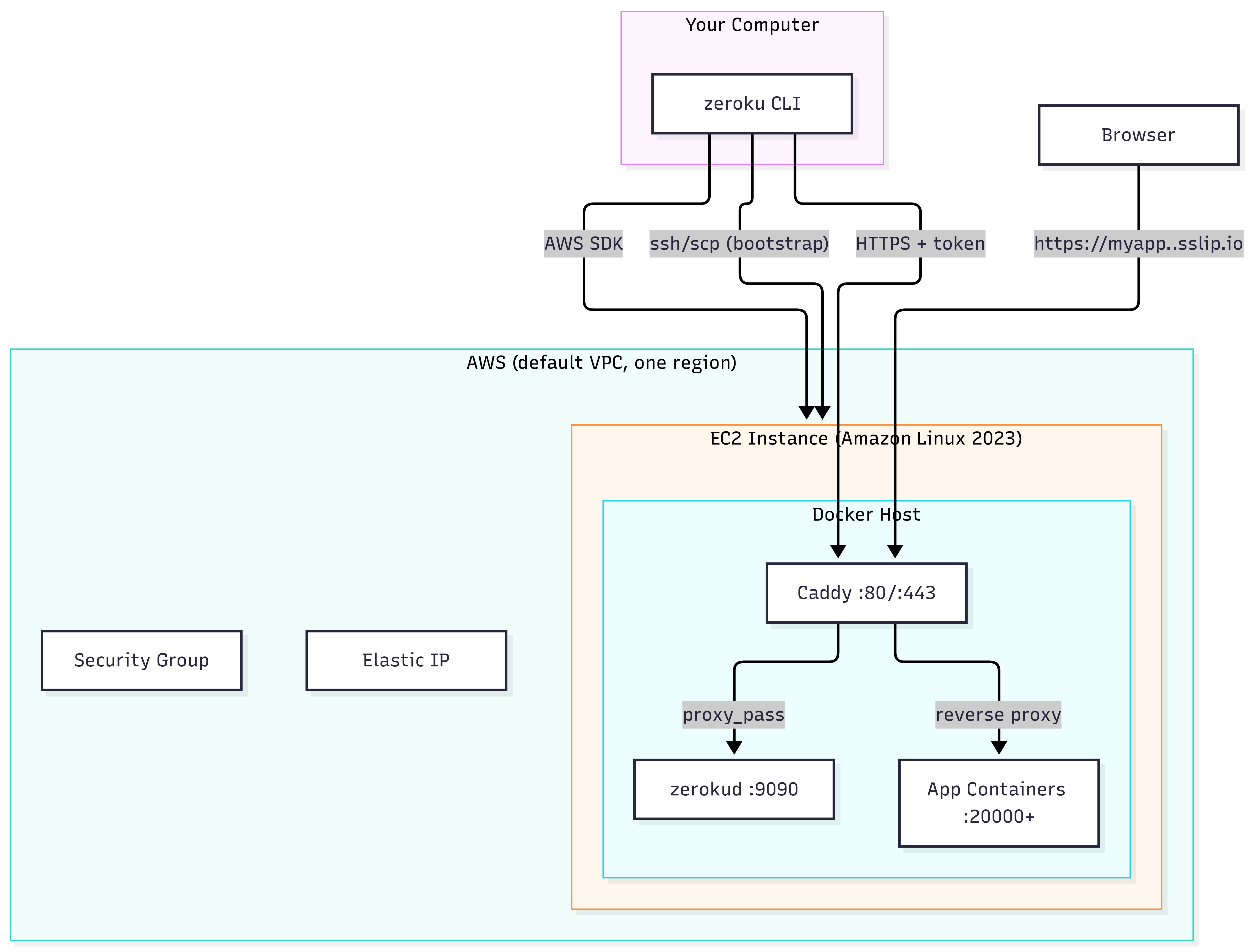
The flow is pretty straightforward: your CLI talks to AWS to spin up an EC2 instance, then sends commands to the daemon through Caddy. The daemon manages your app containers, and Caddy routes traffic to them with automatic HTTPS.
Why These Choices?
- One EC2 instance (default VPC): avoids surprise bills from NAT gateways and load balancers
- sslip.io for DNS:
myapp.<ip>.sslip.ioserves as the default domain - Caddy with host networking: handles HTTPS automatically and can reach your apps on localhost
- JSON state file: allows atomic writes, no database needed
- New container per deploy: swap the proxy target, stop the old one. Gives little to zero downtime and easy rollback
What’s Included
Works with:
- Public GitHub repos that have a Dockerfile at the root
- Apps that read the port from a
PORTenvironment variable
Not included: load balancers, ECR, webhooks, web UI, private repos, multiple instances, databases, custom domains, autoscaling, Terraform.
The Plan
zeroku initcreates everything and gives you a working control plane URLzeroku deploy <repo>prints a workinghttps://URLlist,logs -f,stop,rollback,destroyall work- Failed builds and crashing apps don’t kill the running version
- API rejects requests without a valid token
- README with setup steps and a demo GIF
Why Build This?
It’s easy to take infrastructure provisioning, container management, routing, authentication, and persistent state for granted when using an existing platform. I wanted to get my hands dirty with all of it and see how these pieces fit together when you’re the one responsible for making